Auto-checkout guides
Divine Auto-Checkout: How It Works, Costs and Risks
Divine auto-checkout, or ACO, is a service intended to automate purchase attempts for selected product releases and restocks. The main Divine listing on Whop advertises “free autocheckout,” but the membership is not necessarily free: the monthly option we checked showed a $27 initial fee, a 30-day trial and $74.99 per month. A slot is an opportunity to submit a purchase attempt, not a promise of an order or a profit.
Public sources checked November 8, 2026.
This guide is based on Divine’s public listing, help pages and terms, plus account-provider and Whop documentation. It is not a firsthand test of Divine membership or its ACO service. Availability, fees and instructions can change; confirm the details for your own plan before paying or submitting a slot. See our editorial approach for how we use public sources.
Key takeaways
- “Free autocheckout” does not mean a free membership. The monthly plan selector showed a $27 initial fee alongside a 30-day trial and a $74.99 monthly rate. Confirm the timing and total at checkout.
- Slots are release-specific. Divine describes restock and scheduled-release slots, but its public guides do not establish a universal slot limit or a guaranteed number of opportunities.
- Email access is a real security decision. A provider-generated app password keeps your main password separate, but it can still give an app access to your mailbox.
- An attempt can become an unwanted order. Decide what you are willing to buy and spend before submitting anything, and check how to withdraw an active slot.
- Results are uncertain. Retailers can cancel orders or enforce their policies, and reselling expenses can outweigh any gains.
Jump to how slots work, costs, email security, or the decision checklist.
How does Divine auto-checkout work?
Divine describes ACO as slots for automated attempts to buy products from participating retailers or during particular releases. Its slot-type guide lists examples of retailer-specific restock slots and scheduled-release slots. It also says members can request coverage for a particular site or release; a request is not a guarantee that a slot will be offered or that an item will be purchased.
Think of a slot as an instruction to participate in a particular opportunity, not as a reservation of inventory. A retailer may sell out, decline payment or cancel an order. Divine’s terms of service say it does not guarantee success or profit and warn that automation may cause unintended orders, charges or account actions.
For the broader membership context, see our Divine overview. If your interest is mainly trading cards, compare the offers in Divine Cards vs. Divine Pro; do not assume the separate Cards offer includes ACO just because the main listing mentions it.
What does a practical setup look like?
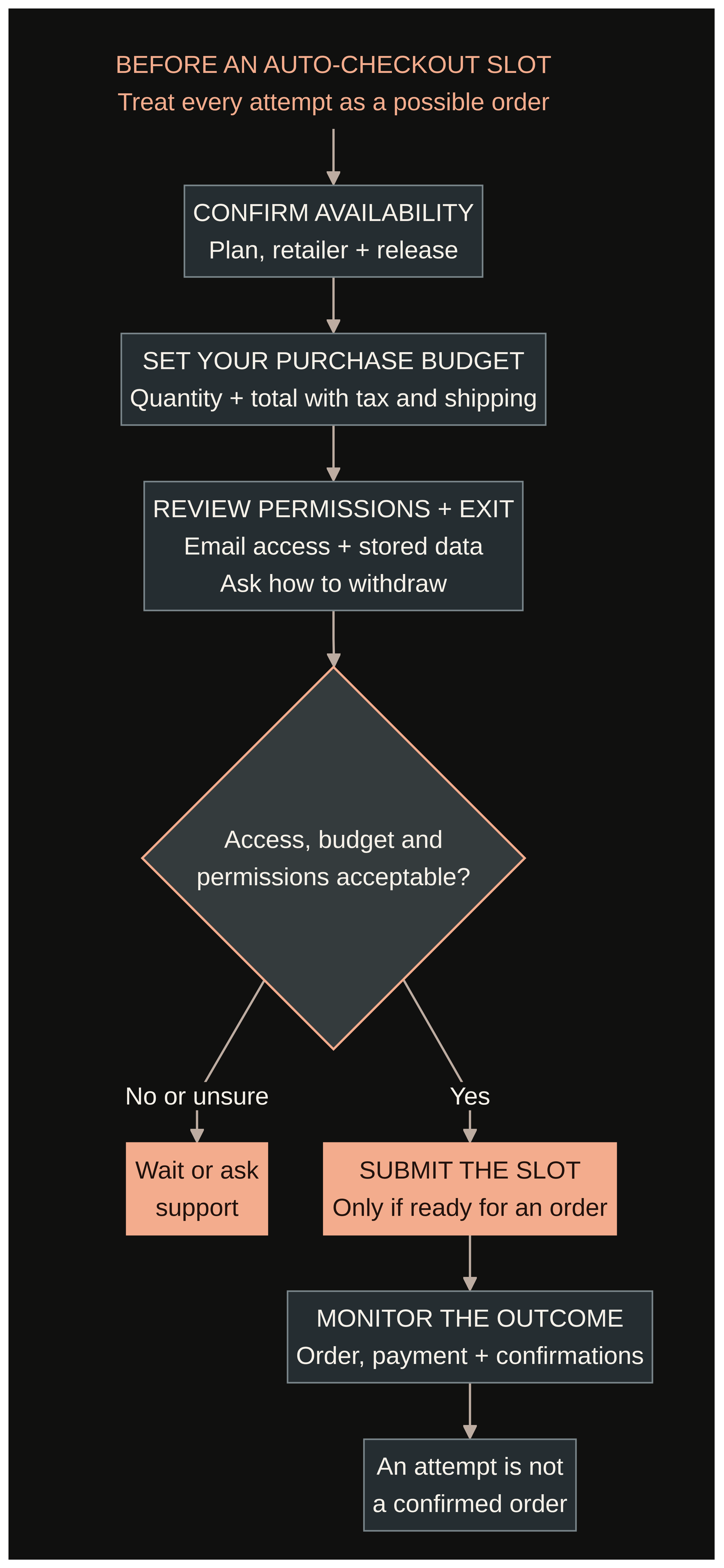
The public guides establish the broad process, but they do not verify every current screen or requirement. A sensible sequence is:
- Confirm access and the opportunity. Ask Divine whether your exact plan currently has ACO access, which retailer or release is covered, and whether you are eligible. Read that slot’s current instructions and the retailer’s purchase rules.
- Decide on the purchase before submitting. Check the item, permitted quantity, expected total including shipping and taxes, and your budget. Divine’s ACO best-practices guide refers to submitting profiles through forms and notes that some slots allow more than one item. It does not establish that every slot offers the same choices.
- Review any information or email access requested. Divine’s IMAP guide describes connecting email for automated verification. Ask whether it is required for the specific slot and what information will be stored or shared before proceeding.
- Monitor the outcome. Check the relevant retailer account, payment activity and confirmation messages. If an order appears, verify its details and the retailer’s cancellation or return options. An attempted checkout is not the same thing as a confirmed, fulfilled order.
Do not submit a slot unless you are prepared for a purchase to happen. The public sources reviewed do not establish a universal spending-control feature, a final approval step or a reliable withdrawal deadline. Ask how those work for the specific opportunity instead of assuming they exist.
Are there limits on Divine ACO slots?
There may be limits on access, entries, quantity or timing, but we did not find a single public number that applies to all Divine slots. The best-practices guide expressly says that some slots allow multiple items; it does not say every slot does or specify a universal cap.
Before acting, ask how many submissions your membership permits, whether opportunities have a capacity or deadline, and whether one submission can result in more than one order. Also ask what happens when a slot fills or a release is postponed. The examples in the public guide show possible categories, not a live inventory of available opportunities.
What does Divine auto-checkout cost?
The main Whop listing advertises free autocheckout as part of the broader Divine offering. On November 8, 2026, its plan selector showed a monthly option described as $74.99 per month, a 30-day trial and a $27 initial fee. The same selector showed a separate $699 per year option. Divine’s homepage describes its promotion as $27 for the first month, then $74.99 per month.
The listing also displays a “Start free trial” button, but the plan selector’s initial fee matters: do not interpret that button as proof that nothing is due upfront. Check the selected plan, eligibility, amount due today, trial end date, first recurring charge and renewal terms on your own checkout screen. We did not complete a purchase, so we cannot confirm the final total or how the checkout applies to every buyer.
“Free autocheckout” is a statement about the advertised service, not proof that all uses and related expenses are free. We could not verify whether every slot, success, provider or optional tool has an extra charge. Ask for a written breakdown before joining or submitting, including any success or per-slot fee, optional service costs, taxes and applicable charges. Do not treat an unverified fee as either confirmed or zero.
Budget separately for the item itself, shipping, sales tax, marketplace fees, packing, returns and any money tied up while inventory waits to sell. Our Divine reselling cost guide covers the wider budget question.
For a simple illustration, suppose two items each produce $40 after inventory, shipping and selling fees, but before membership and other costs. Together they contribute $80. Subtract a $74.99 monthly membership and $5.01 remains before any other expenses or income taxes. This is arithmetic, not an estimate of likely sales: an unsuccessful month can leave you with the membership cost and no sales to offset it.
Check the current Divine offer on Whop
What are the email and app-password risks?
Divine’s IMAP setup guide says its ACO email entries accept Gmail and Yahoo and describes using an app password rather than your normal email password. IMAP is a way for an application to access and manage mail. Divine says automation can use it to read verification codes and confirmation links.
An app password is still a credential. Depending on the provider and connection, access can expose messages beyond a single shopping confirmation and may allow mailbox management. The separate password is not a privacy guarantee, and a stolen app password could be misused without someone knowing your main password. Google’s app-password guidance describes app passwords as access for less secure apps and recommends revoking one when it is no longer needed.
Before connecting an inbox, ask who operates the ACO service, exactly what it can read or change, how credentials are stored, how long access lasts and how to remove it. Consider a separate mailbox that contains no sensitive personal or financial messages. Avoid forwarding unrelated mail into it. Never enter your normal email password into a field intended for an app password, and do not share any credential until you trust the recipient and understand the permissions.
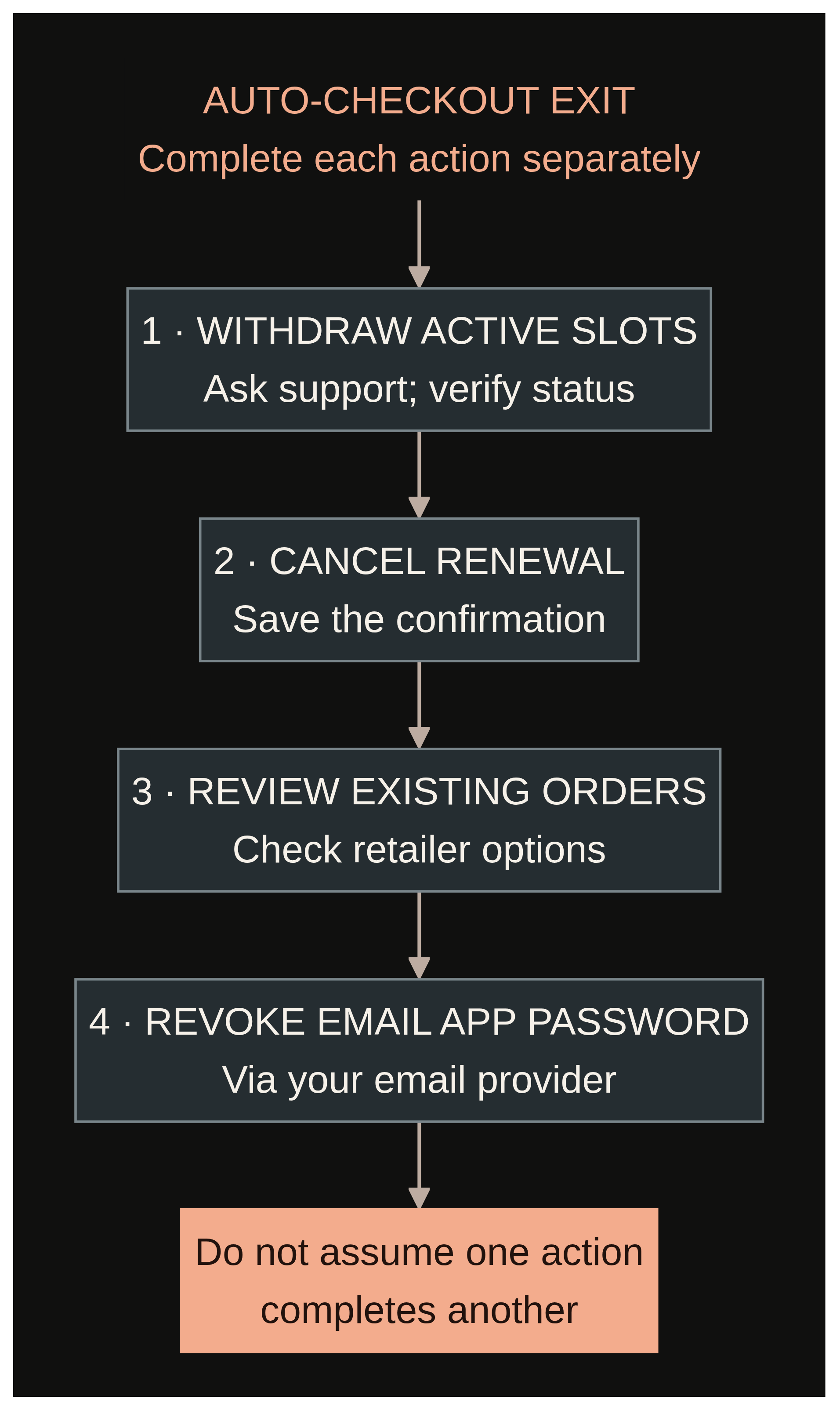
When you stop using the connection, remove the app password through your email provider and review any forwarding or connected-app settings you created. Google says changing your Google Account password revokes its app passwords as well; that may affect other apps using them. Revoking email access is separate from canceling a subscription or stopping an active slot, so address each one independently.
What happens if an order is unwanted or a retailer cancels it?
You may be responsible for an order even if automation made the purchase attempt. Divine’s terms expressly warn about unintended orders and charges. A retailer’s own order, cancellation and return policies determine what options are available; an order confirmation does not necessarily mean the item will ship.
Use accurate information and follow the retailer’s purchase limits and account rules. Divine’s terms also place responsibility on users to comply with third-party policies and warn of possible account suspensions and financial losses. Do not rely on workarounds to defeat retailer limits or security checks.
Before submitting, identify the worst acceptable outcome: for example, an order for the maximum allowed quantity that you cannot immediately cancel and must hold or return under the retailer’s rules. If that outcome would strain your budget, skip the slot. If an unexpected order occurs, contact the retailer promptly and review its published options; do not assume Divine can reverse it.
How do you cancel the membership and active slots?
For a Whop subscription, Whop’s cancellation instructions say to sign in, open Profile → Orders, select the subscription and choose Cancel membership. Divine’s terms say memberships renew automatically unless canceled before renewal and generally state that payments are non-refundable, except where required by applicable law. Its cancellation policy says access may end immediately or at the end of the billing period, so confirm the outcome shown for your plan.
Save the confirmation and check that renewal is no longer scheduled. Canceling a membership is not documented as a reliable way to remove every previously submitted slot or undo an order. Ask Divine support how to withdraw active entries and verify their status separately. Then revoke any app password you no longer want the service to use and handle existing retailer orders under the retailer’s policies.
Who might benefit—and who might not?
ACO may be worth investigating if you already understand a particular product market, have room in your budget for inventory, and are comfortable accepting the possibility of an automated order. It is more compelling if the specific releases you want are actually offered and the membership’s other resources are useful to you even in a month without a successful checkout.
It may be a poor fit if you need predictable income, cannot absorb a surprise purchase, are uncomfortable granting mailbox access, or only want one item from a retailer whose rules prohibit the proposed method. It is also reasonable to wait if support cannot explain costs, limits or how to stop an active slot. A manual purchase or simply passing on the release may fit better.
Our resale-community evaluation guide provides a broader checklist for deciding whether any membership fits your time, budget and risk tolerance.
A before-you-join decision checklist
Write down your answers before you pay or provide credentials:
- Target: Which exact product, retailer and release do I want? Has Divine confirmed a currently available slot for it on my plan?
- Authority: Can an attempt place an order without another approval? What are the maximum quantity and total charge I would accept?
- Limits: How many slots or entries may I submit? Are capacity, deadlines or multiple successful orders possible?
- Cost: What is due now, when is the next charge, and are there any per-slot, success, tool or other fees? What is my separate inventory budget?
- Security: Is IMAP required for this slot? Who can access the mailbox, what can they do, and how do I revoke that access?
- Exit: How do I withdraw the slot, cancel the Whop renewal and handle an order that has already been placed?
- Fallback: If no checkout succeeds—or an item cannot be resold profitably—can I comfortably absorb the costs?
If an important answer is unclear, keep it marked as unknown and ask support before proceeding. A useful question is: “For this plan and this specific slot, please confirm the total fees, maximum quantity, required email access, and how I can withdraw my entry.”
Frequently asked questions
Is Divine auto-checkout guaranteed to buy an item?
No. A slot is an attempt, not a reservation or a guaranteed checkout. Divine’s terms disclaim guarantees of success, and retailers can cancel or decline orders.
Is the 30-day Divine trial free?
The main listing’s button says “Start free trial,” but the monthly plan selector we checked also displayed a $27 initial fee. Confirm the amount due now and the first renewal date at checkout rather than assuming a zero-cost start.
Does Divine Cards include auto-checkout?
The main Divine listing advertises free autocheckout. That does not establish that the separate Divine Cards offer includes it; ask the provider about the exact plan before buying.
Can I stop an active ACO slot by canceling my membership?
The public sources we checked do not confirm that membership cancellation withdraws active slot submissions. Ask support for the withdrawal process and verify the status of each entry separately.